Apple Made a Home Screen That Controls Your Door, Cameras and Heating
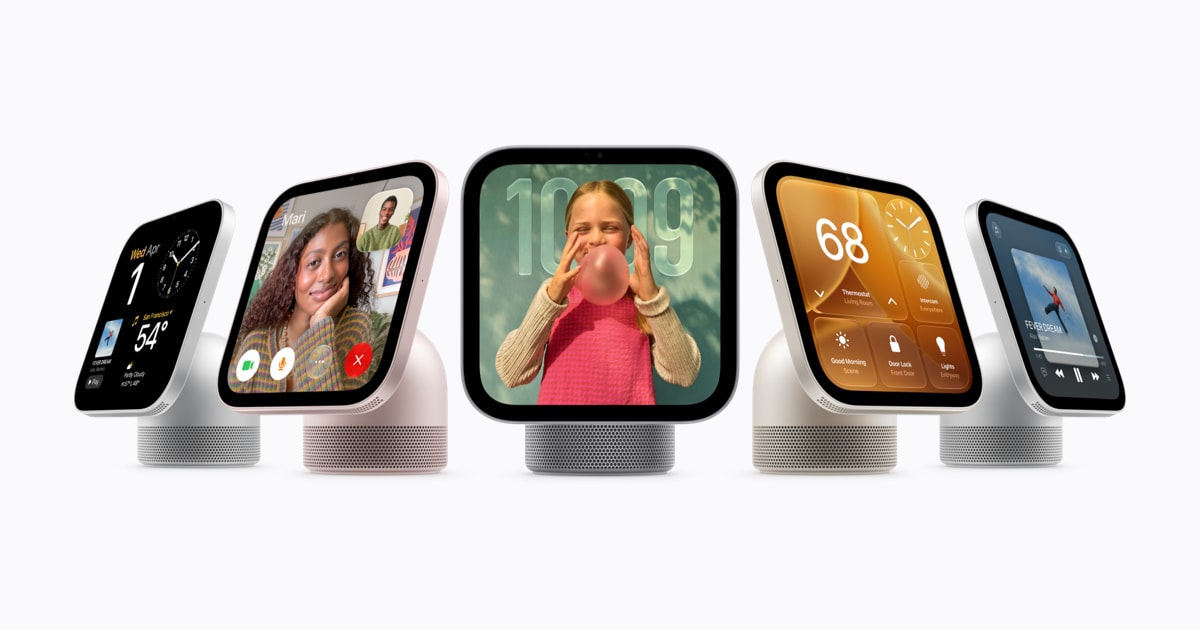
Apple announced Apple HomeView on October 13, 2026, alongside a six-device Apple Home Collection made with LG Electronics and Schneider Electric. Think of HomeView as a small screen with a speaker that works like a remote for your house. Apple
The collection includes a video doorbell, indoor and outdoor security cameras, a door lock, and two thermostats. All six can be controlled from HomeView or from other Apple products such as an iPhone.
HomeView is Apple's first display made for the smart home. Apple showed the hardware after its "Welcome Home" event. Earlier reports had described an Apple smart-home hub under the code name J490. Reuters
Pre-orders for HomeView opened October 13, 2026. Sales start November 13. The device can sit on a table or hang on a wall.
HomeView hardware and interaction
HomeView has a 7-inch screen on top of a rounded speaker base. The screen part is aluminum and tilts on a steel hinge. The table version comes in silver, starlight, rose pink, and space gray, each with a matching cable. The wall version comes in space gray and silver.
The screen adjusts to the home. True Tone changes screen color to match room light. Brightness goes from bright 500 nits down to a very dim 0.3 nits for dark rooms. The screen also changes with distance. It shows simple information from across the room and more detail when you step closer.
The wall version uses three special mounts from Schneider Home. Apple lists self-installation and professional installation as options.
HomeView recognizes faces, and that check happens on the device itself. It remembers up to six people. Each person gets their own Home Screen with apps and widgets, plus access to personal content in Messages, FaceTime, Calendar, Reminders, and Find My.
You talk to it with Siri AI, described as an entirely new version of Siri that is more capable and conversational. When paired with a device that supports Apple Intelligence, Apple's personal AI system, HomeView can use personal context from Calendar, Messages, and relevant information across apps.
Lock, doorbell, cameras and thermostats
The entry hardware comes from LG. The LG smart lock costs $349 and supports Apple Home Key to unlock without touching your phone as you walk up. It uses UWB, a short-range wireless signal that senses how close you are. It can also be opened with a PIN code or with a physical key through a keyhole beneath the keypad. The Verge
The LG video doorbell costs $249. It has two cameras with up to 2.5K resolution, which means very sharp video. One records visitors and one looks down for package deliveries. A motion-activated light is built in.
Indoor coverage is a $199 plug-in camera from LG. It records up to 2.5K resolution. The camera tilts up and down on its own. It can be set to face downward when you return home, so it is not watching you.
Outdoor coverage is wired, with two models. A $399 model includes motion-activated floodlights. A $299 model leaves out the lights. Both are part of the same Apple Home Collection.
For heating and cooling, LG supplies a round thermostat. Schneider Electric supplies a square model. Both cost $199 and both support Matter, a common language that lets devices from different brands work together.
The broader background here explains who builds what. LG handles the lock, doorbell, indoor camera, and one thermostat. Schneider Electric handles the second thermostat and the wall mounts for HomeView. Control stays on Apple screens. Locks, wired outdoor cameras, thermostats, and wall mounts need special work with mechanics, wiring, and safety approval.
In my view, the small details will shape daily use. Hands-free unlock means no phone fumbling at the door. Two doorbell cameras split visitor and package views. A camera that turns down gives a clear privacy signal. Face recognition for six people solves the shared-screen problem. My kids adopted shared tablets by negotiating profiles. A home display needs the same negotiation, handled faster and with less argument.
For families setting it up, it is worth noting one setup rule. Siri AI runs on HomeView, but use of personal context from Calendar, Messages, and other apps requires pairing with an Apple Intelligence-enabled device. Brightness and distance views, motion lights, and unlock range also need testing in real rooms.
The longer-term picture is hopeful. A display that knows household members, stays dim in a bedroom, and works with standard thermostats points toward a home that needs less setup. If the sensors hold up in daily use, the gain is time back rather than another screen to manage.


