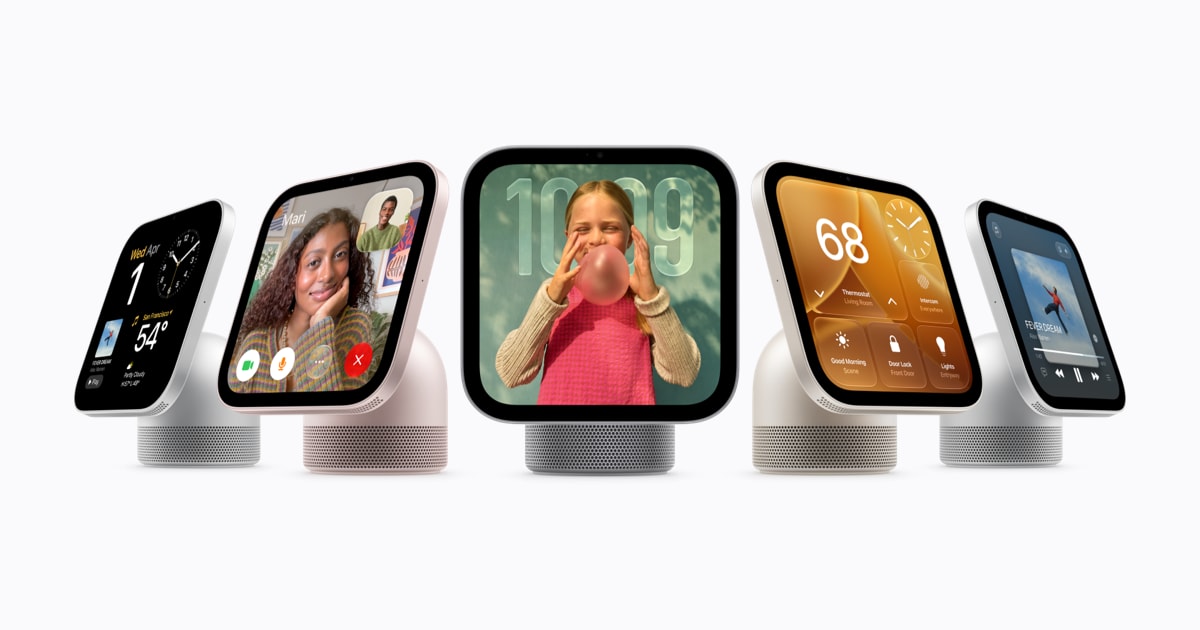
Your New Apple Home Speaker Will Still Need Your iPhone

Apple's new HomeView speaker cannot play four Apple services by itself. Apple TV, Apple Books audiobooks, Apple Music Classical, and Apple News Plus need AirPlay from a paired and compatible iPhone nearby The Verge.
Apple states this rule in its HomeView announcement materials. The note about select apps needing a paired and compatible iPhone nearby covers the four services detailed on Oct. 14. In simple terms, the phone runs the app and HomeView plays the sound and picture.
There is no App Store on HomeView. It uses the Apple A18 chip, the same chip used in the iPhone 16 The Verge.
Looking at that choice, power is not the issue. Apple just did not allow outside software to install directly.
HomeView also does not run video apps by itself. For video apps, you need an iPhone or iPad AppleInsider. That is a wider rule than the one for the four Apple services, which specifically asks for a paired and compatible iPhone.
Music is what runs on HomeView itself. Apple says HomeView plays Apple Music with moving album art and on-screen lyrics Apple. Apple describes HomeView as the perfect way to enjoy Apple Music with multiroom audio throughout the home. No third-party way to play video directly was described in the verified materials.
This is a three-product launch. Apple showed the HomeView Hub priced at $299 Bloomberg. It also showed a new Apple TV 4K box and the HomePod mini 2 speaker. Apple had planned to launch its new smart-home hub on Oct. 13 Reuters. Apple's Newsroom has a press release titled "Meet Apple HomeView, a new way to enjoy entertainment and manage the home." It also has one titled "Apple unveils the new Apple TV 4K, supercharged by Siri AI."
Looking at how the system is set up, HomeView is like a helper speaker for your phone. Basic music and home controls live on the speaker. Harder jobs, like protected video and personal libraries, stay on a nearby iPhone or iPad and are sent to HomeView over AirPlay. That keeps passwords, setup, and updates on the phone, with no separate store or extra logins on HomeView.
In my view, this tradeoff is common with helper devices. One wireless path can serve many apps without rebuilding them, which means less work and fewer fixes. The downside is dependence. You need a compatible phone nearby, charged, and paired. App makers get no direct way to install these kinds of apps. Home Wi-Fi and phone settings become part of whether the living room works smoothly.
Worth flagging for home buyers is the split job. HomeView handles music in many rooms and home control. The new Apple TV 4K handles video without needing a phone nearby. If you want background music with lyrics and pictures across rooms, that is what Apple kept on the hub.
The broader context here is families that already use iPhones. My two kids never read manuals. They just kept tapping share and cast until something played. HomeView builds on that habit. It expects the phone to be close and makes the speaker the easy choice. Over time, simple music and home control like this tend to get used a lot. The thing to watch is whether sending from a nearby phone stays so simple that people forget about it.