Granola's New Apple Watch App Lets You Record Meetings From Your Wrist
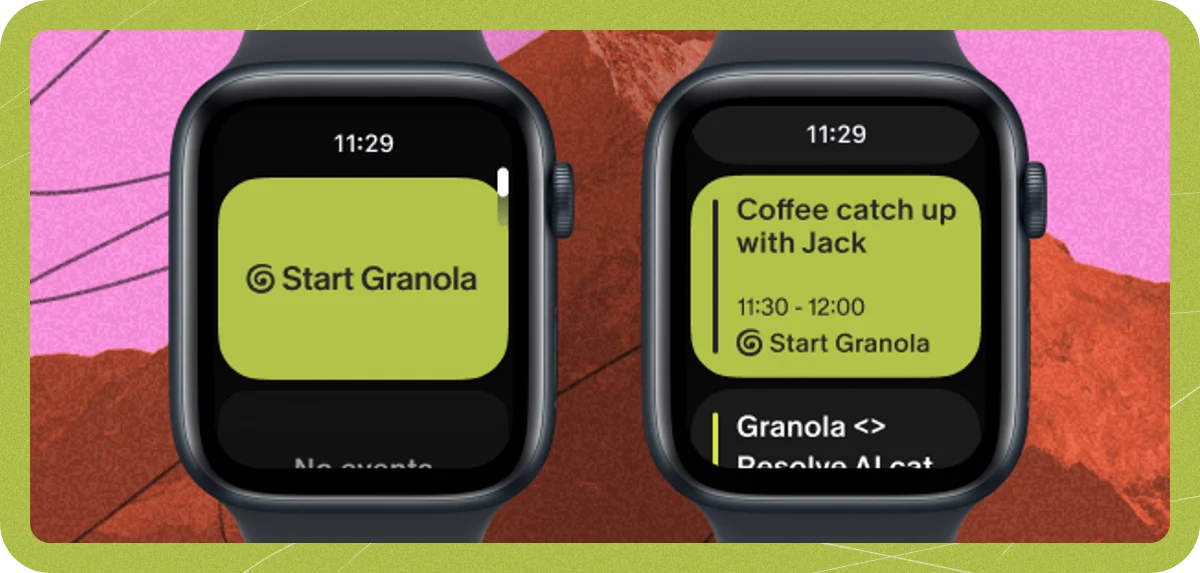
Granola launched an Apple Watch app on July 28, 2026, bringing its AI note-taking service to the wrist. The app requires an Apple Watch running watchOS 11 or later and works together with Granola's existing iPhone app, which came out in 2025 (TechCrunch).
Users can add Granola as a small widget on their watch face, letting them start recording a meeting with a tap instead of opening a separate app. The watch face also shows reminders about upcoming meetings. While recording, the audio is saved directly on the Watch itself (Granola Help Center).
Granola co-founder Chris Pedregal told TechCrunch the Apple Watch app is designed for capturing in-person meetings without taking a phone out, such as during walking one-on-one meetings. The idea is to cover situations where pulling out a phone is awkward or impractical. Granola tested the app internally with employees who owned Apple Watches, and found that a large portion of their mobile usage shifted from the iPhone to the Watch. Granola said it was easier to build an Apple Watch app than to integrate with another hardware product (TechCrunch).
The launch follows a period of fast growth for the company. Granola became a unicorn in early 2026 — meaning a private startup valued at $1 billion or more — after raising $125 million in a funding round led by Index Ventures, reaching a $1.5 billion valuation. The platform is currently available for macOS, Windows, iOS, and Android, according to the company's official website (Granola).
The technical choice to record audio on the Watch itself, rather than sending it to the paired iPhone, is worth noting. Recording locally means the Watch does not depend on a Bluetooth connection to the phone, avoiding delays and reliability problems that can happen when passing audio between two devices. The Watch works as a standalone recorder during the session, with the actual transcription and note creation likely handled afterward through Granola's existing online or on-device AI system.
The broader context here is the gradual shift of AI capabilities from distant cloud servers onto the devices we carry and wear. We have watched this progression from voice assistants that needed an internet connection to transcription that can happen on a phone, and the Apple Watch is one of the smallest, most limited devices to attempt this. Battery life, heat, and microphone quality all set hard limits. Granola's decision to record on the Watch rather than rely on the iPhone's better hardware suggests they chose independence and speed over pure audio quality. Whether that trade-off pays off in accurate transcripts at scale will be the thing to watch.
What is harder to judge from the outside is whether recording from the wrist actually changes how people behave or just adds a layer of convenience. Granola's internal data showing mobile usage shifting from the iPhone to the Watch is a strong hint. The wrist is a more natural place for quick, spontaneous actions, and a walking meeting is exactly the kind of situation where a phone feels intrusive but a watch does not. The open question is whether that convenience holds up in noisy environments, where a watch microphone on your wrist may pick up more background sound and arm movement than a phone held closer to the person speaking.
For people who already use Granola, the Apple Watch app removes a real friction point: pulling out a phone, opening the app, and starting a recording before a conversation can naturally begin. Even a few seconds of delay can disrupt the flow of a meeting. A watch face widget shrinks that to a single tap, or possibly a hand gesture if Granola adds new ways to interact in future updates.
The market for AI meeting notetakers is crowded, with several platforms competing to become the tool people use during their workday. Granola's move to the wrist does not by itself create a lasting advantage, but it does put the company in a format that most competitors have not focused on. If recording from the wrist proves reliable enough for everyday use, it could change what people expect from meeting tools.


